





In a leatherworking clip, the moment a loose stitch pulls tight can be more informative than the finished row of neat stitches. A visual treatment may make the leather look richly textured while hiding that brief change. The viewer sees an attractive object but misses the action that explains how it became that way.
A craft-process video earns attention through visible transformation. Before choosing a new style, identify the moment when the material changes and the evidence that makes the change understandable. The treatment should leave that moment legible. Otherwise, it may work as an impression of the craft while failing as a useful view of the process.
Identify the Before and After Inside One Action
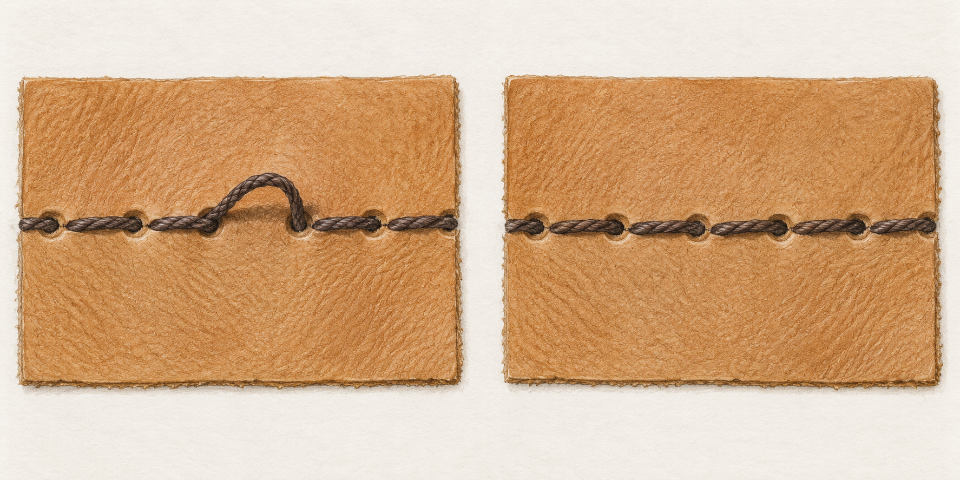
Take a hypothetical clip of a maker tightening one stitch. Before the pull, a loop remains loose above the leather. Afterward, the thread lies against the surface. The viewer needs to see enough of both states to understand the action. A close-up of the final result alone shows quality or appearance, but it cannot explain the transition.
Choose the change you want the audience to notice. It might be a seam closing, a fold taking shape, or a surface becoming smoother. Do not ask one short clip to explain an entire craft. A clear small action gives you a concrete basis for judging what survives a transformation, and it helps distinguish instructional value from general atmosphere.
AIVideoEditor.me offers video style transfer and video-to-video transformation from an uploaded clip. A maker can use those routes to explore an illustrated or otherwise stylized presentation of existing movement. The result still needs inspection. A claim that the source action guides the output is not a guarantee that every small material change remains readable.
Separate Surface Decoration From the Event Being Shown
The leather’s color and texture can change the mood of the image. The position of the thread explains the stitch. Those elements may overlap visually, but they perform different jobs. If the new texture introduces bright lines that resemble thread, the viewer may struggle to see which line is moving. More detailed rendering can therefore reduce clarity rather than improve it.
An AI video editor can help explore a simpler treatment when the recorded scene feels visually cluttered. Describe the desired style while keeping the action central to the brief. Avoid asking for so many decorative effects that the material transition becomes a minor element. Compare the generated candidate with the source at the exact moment of the pull.
A soft drawn treatment may reduce irrelevant background detail, but it can also soften the edge that distinguishes loose thread from leather. A high-contrast treatment may separate them while exaggerating every surface mark. There is no universal winner. The useful choice depends on the particular material, the recording, and what the viewer is supposed to learn from this shot.
AIVideoEditor.me can produce another interpretation from a revised description if the first one obscures that edge. Change the aspect tied to the failure, such as reducing texture around the stitch. Then inspect the whole action again. A clearer final frame is insufficient if the loop disappears or changes shape unpredictably during the movement.
Keep the original recording available and identify it clearly in the working files. A stylized version may become visually familiar after several reviews, making it easy to forget what the source actually showed. Return to the source whenever there is a question about the material or the order of events. Do not let an attractive generated detail become part of your explanation by repetition.
Three Steps to Inspect the Material Change
Pause just before the stitch tightens. Can you identify the loose part and the direction in which it will move? Then replay the action. You should be able to connect the initial loop to the tightened thread without guessing that they are the same element. This viewing exercise is more useful than judging the treatment from a promotional still.
When you edit videos online, keep the final display size in mind. A line that is visible on a large editing canvas may disappear in the small player used by the audience. Check the exported clip in that setting. If the material change is too small to see, a better source crop or a clearer recording may help more than another style variation.
Next, watch without explaining the process aloud. Ask a viewer to describe what changed in the material. If they say only that the picture became brighter or the camera moved, the intended event may not be carrying the shot. Ask what detail led to their answer. That gives you a specific part of the sequence to inspect rather than a broad judgment that the clip is confusing.
Keep a failed version for comparison if the defect is subtle. Seeing a loop disappear beside a version where it remains visible can clarify the choice for someone reviewing only the finished candidates. Explain the visible difference directly. A short note such as “the thread vanishes before the pull ends” is more useful than a score for cinematic quality.
Some actions depend on pressure, resistance, or touch that a short video cannot convey. A visible stitch tightening does not teach every aspect of the technique. Keep the claim proportional to what the clip shows. A maker can explain the remaining detail separately, using authentic demonstration and careful wording, instead of treating the generated sequence as a complete lesson.
Look at the action immediately after the change as well. If the thread snaps back to a loose loop or the seam resets, the sequence contradicts the event it just presented. A looping social clip may invite that problem if the ending is forced to match the opening. Prefer an honest stopping point when a seamless loop would undo the material transformation.
AIVideoEditor.me is useful for exploring visual character, while the source recording establishes what the maker did. If the transformed version cannot preserve a readable transition, keep it for an explicitly artistic montage or leave it unused. The effort spent generating a treatment does not make it suitable for every role in the finished video.
Retain the Process Even When a Simpler Clip Wins
Choose the treatment that lets the audience see the material move from one state to the next. For some recordings, that will be a restrained transformation. For others, the original close-up will remain clearer. AIVideoEditor.me suits a maker who wants to explore a different visual tone and can compare the whole output against the recorded action.
Keep a distinct role for a beauty shot of the finished object. It can close the sequence without being asked to explain how the object was made. The process shot has a different responsibility: show the change clearly enough that a viewer can point to what happened.
When that small event remains visible, the clip can be engaging without excessive decoration. Let the craft supply the interest. A treatment that conceals its defining action has removed the most useful part of the footage, however appealing the surface becomes.