





b2b explainer videos fail when they make a complex product sound simple by making it less true. A technical buyer notices a missing dependency. A finance reviewer notices that the savings claim has no basis. A user notices that the interface on screen does not match the workflow being described. The animation can be attractive and still create more doubt than clarity.
TapVid is an Explainer Video Engine that works from supplied assets and approved copy. That is relevant for B2B teams whose product images, UI, parameters, and wording need to remain controlled. The production tool does not decide what is true. A buyer-ready process must make evidence, ownership, and limitations explicit before the first render.
This guide replaces the usual “problem, solution, benefits” outline with a decision system built for multi-stakeholder sales. It helps marketing teams explain enough to move a deal forward without compressing away the facts that technical, financial, and operational reviewers need.
Define the Decision, Not a Generic Audience
“Enterprise buyers” is not an audience. It is a group of people with different risks.
An end user asks whether the product will make daily work easier. A manager asks whether adoption will stick. A technical reviewer asks how the product fits the stack. Procurement asks what is included. A budget owner asks whether the change is justified.
Choose one decision for one primary role. A useful brief states:
- The role watching.
- The problem already recognized.
- The decision the video should support.
- The facts that role must verify.
- The next action after watching.
For example, a workflow platform may need a homepage explainer for operations leaders. Its job is not to answer every security question. It should establish the broken handoff, show the new workflow with real product evidence, and lead to a deeper evaluation. A separate technical explainer can cover architecture and controls.
Build a B2B Explainer Videos Claim Register
The claim register is a simple table that stops attractive copy from outrunning the product.
| Claim | Claim type | Required evidence | Owner | Allowed wording |
|---|---|---|---|---|
| The product performs an action | Product behavior | Current UI or documentation | Product | Literal behavior |
| The product connects to a system | Integration | Current integration documentation | Technical | Exact supported scope |
| A process becomes faster | Outcome | Measured internal or customer evidence | Business owner | Attributed, bounded result |
| A control meets a standard | Compliance | Current approved documentation | Legal or security | Approved wording only |
| A service is available | Commercial | Current plan or contract | Sales operations | Current terms only |
Do not use an internal assumption as external proof. Do not turn one customer outcome into a universal result. If evidence is not available, narrow the sentence until it becomes factual or remove it. A documented TapVid test used a fictional Northstar Labs brief and recorded a request to move two-factor authentication before Slack setup while leaving the other defined constraints unchanged. The screenshot below proves the revision request and visible scene context only. It does not prove a speed, conversion, or customer outcome.
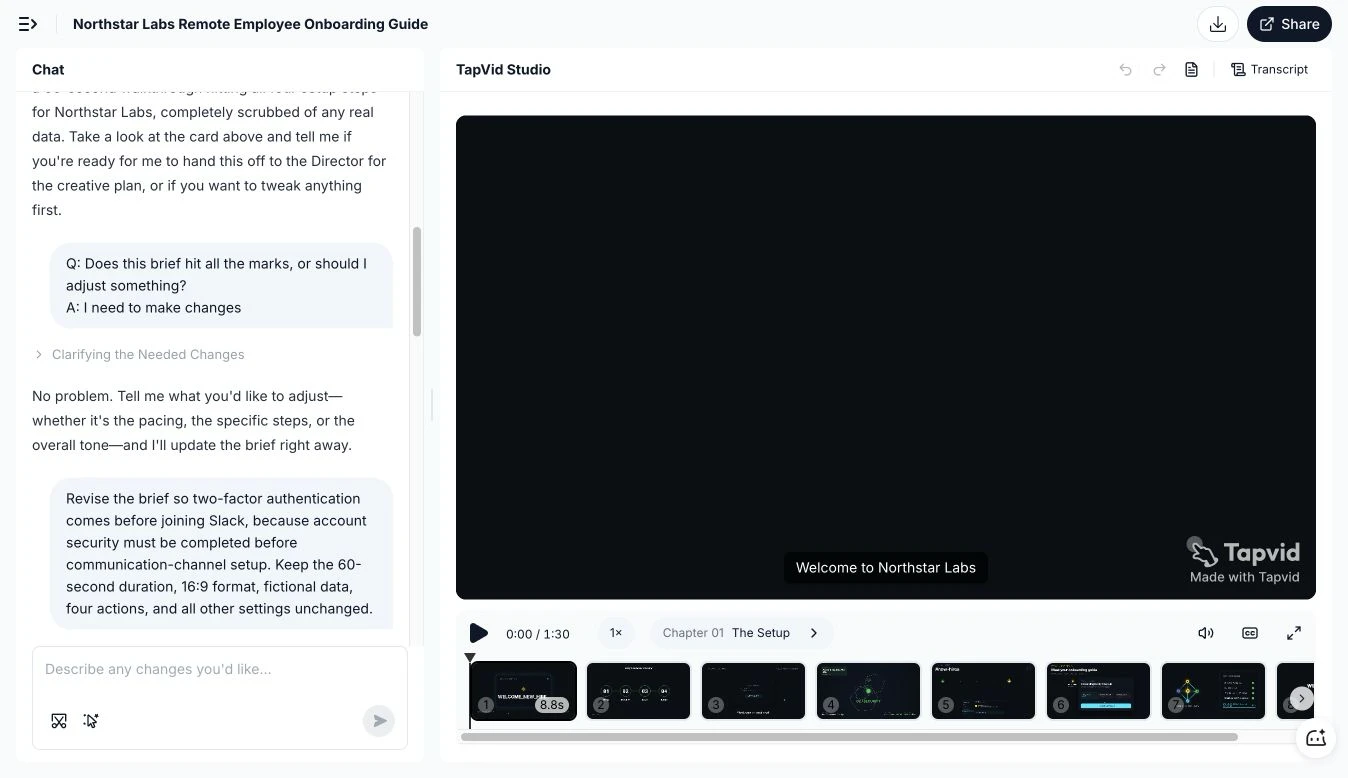
Figure: A visible sequence and a precise change request make it easier to review what changed and what stayed in place.
The register also speeds approval. Reviewers do not need to debate every adjective. They can inspect the claims that fall inside their responsibility.
Map the Buying Committee
A single B2B video often tries to please everyone and becomes generic. A better system uses one core story with role-specific proof modules.
The user module
Show the real task, the current friction, and the new sequence. Use product screens or a workflow diagram. Avoid broad statements about transformation.
The manager module
Show handoffs, visibility, standardization, or review points. Explain what the manager can observe or control. Do not invent adoption or productivity results.
The technical module
Show where the product connects, what enters, what leaves, and which boundary remains outside the product. Use exact system names and current documentation.
The commercial module
Explain scope and next steps without putting unstable pricing or contract language into a long-lived video. Point the viewer to the current sales or pricing surface when needed.
Figure: One core narrative can support different reviewers when each role receives the proof needed for its decision.
This modular approach also helps sales teams choose the right cut. A technical evaluator should not have to sit through an employer-brand story to find one integration detail.
Write a Buyer-Ready Narrative
The familiar problem-solution structure still works, but B2B products need two additions: proof and boundary.
Use this sequence:
- Recognized situation. Name a problem the buyer already experiences.
- Cost of the current method. Describe operational friction without inventing a financial number.
- Product role. State what the product does in one precise sentence.
- Workflow proof. Show the real sequence with supplied screens, diagrams, or product assets.
- Boundary. Clarify what the product does not replace or what depends on setup.
- Buyer outcome. State the supported result.
- Next step. Ask for one action that matches the buyer’s stage.
The boundary is important. If implementation requires a data connection, say so. If the video shows one supported workflow rather than every use case, say so. Honest limits reduce the chance that a buyer discovers the real scope after a sales call.
Protect Specifications and Terminology
B2B products carry fragile information: model numbers, API names, thresholds, dimensions, legal wording, chart labels, and industry terms. A single change can alter meaning.
Create a locked-copy list. It should include any text that must appear verbatim and a source location for each item. Mark pronunciation for voiceover. Keep units beside numbers so 10 does not lose ms, GB, or % during editing.
Use the same discipline for diagrams. If a diagram shows data moving directly from system A to system C but the real path includes system B, the visual is inaccurate even if every label is spelled correctly. Review relationships, not just objects.
Use a Scene Evidence Card
Give every scene a small evidence card:
- Scene ID.
- Spoken claim.
- On-screen copy.
- Visual asset.
- Source URL or file.
- Source date or version.
- Reviewer.
- Known limitation.
This card is especially useful when work passes between an agency, a client, and a production platform. The next person can see why the scene exists and what cannot be changed casually.
Figure: A scene becomes reviewable when its claim, source, visual, owner, and boundary travel together.
Review in the Order Buyers Will Challenge You
Do not begin final review with color and pacing. Start with the questions that can stop a deal.
Product truth
Does the workflow behave as shown? Are the screens current? Are prerequisites visible where they matter?
Information truth
Are product names, integration names, specifications, numbers, and regulated statements exact?
Relationship truth
Does each claim appear beside the correct product, screen, diagram, and result? Are inputs and outputs connected correctly?
Commercial truth
Are plan, service, availability, and implementation statements current and approved? If they may change, should they live outside the video?
Presentation quality
Only after the previous passes should the team judge pacing, visual rhythm, voice, music, and brand fit. Beautifully presenting the wrong claim is not progress.
Plan a Video System, Not One File
B2B sales cycles create repeated explanation. One video cannot serve every stage, but one approved system can create several controlled assets.
Start with a master source package and produce:
- A homepage overview for the primary business problem.
- A short role-specific cut for outbound or social.
- A workflow proof clip for sales follow-up.
- A technical cut for evaluators.
- A feature update cut when the product changes.
Reuse approved scenes when their claims remain valid. Do not recut an old screen into a new context just because it fits the aspect ratio. The scene evidence card should determine whether reuse is safe.
For agencies and content teams, scene-level reuse is where structured production becomes commercially useful. A client can change one statement or asset without reopening every approved scene. That does not eliminate review, but it narrows the review surface.
Measure Understanding Before Conversion
Conversion matters, but a video can influence many steps between first view and purchase. Start with measures that match the video’s job.
For a homepage explainer, inspect whether viewers reach the proof section, click to a relevant next step, or arrive at sales conversations with a more accurate understanding.
For a sales-enablement clip, ask reps whether it reduces repeated explanation or surfaces better questions. For a technical clip, track whether reviewers can identify the required integration and next validation step.
Do not claim that the video caused revenue without a method that supports that conclusion. Buyer understanding, question quality, and movement to the next evaluation step are often more defensible early signals.
A Practical B2B Approval Checklist
Before release, confirm:
- One primary role and decision are explicit.
- Every material claim has an owner and source.
- Product behavior is shown with current evidence.
- Specifications, labels, and legal wording are verbatim where required.
- Diagrams preserve real system relationships.
- Limitations and prerequisites are not hidden.
- The CTA matches the buyer’s stage.
- Role-specific cuts inherit approved claims.
- Volatile commercial statements stay on current surfaces when possible.
- The final export matches the approved scene set.
No process can guarantee that every future product state will match today’s video. The team can, however, make the source, version, and owner visible so updates are triggered before the asset becomes misleading.
Frequently Asked Questions
What makes a B2B explainer different from a consumer explainer?
A B2B explainer usually supports a committee decision. It needs enough product, operational, technical, and commercial truth for the relevant reviewer. A consumer explainer may focus more narrowly on one buyer and one immediate action.
How long should a B2B explainer be?
Length should follow the decision and placement. A homepage overview may be brief, while a technical proof clip may need more time. Remove claims that do not support the next decision rather than forcing every topic into one duration.
Should pricing appear in the video?
Only when it is current, approved, and likely to remain useful for the asset’s life. A current pricing page or sales conversation is often safer for details that can change.
Can one video work for every stakeholder?
One core story can, but each stakeholder may need a different proof module. Build controlled variants rather than one generic cut that answers nobody well.
Who owns final accuracy?
Assign ownership by claim type and name one final approver for the export. Marketing alone should not approve product behavior, and product alone should not approve commercial or legal statements.
Clarity Is a Controlled Outcome
B2B clarity does not come from removing every detail. It comes from selecting the details that a buyer needs and keeping them true. Define the decision, register the claims, map each role to proof, and attach evidence to every scene. The result is a B2B explainer that can shorten explanation without creating a new round of doubt.










.