





.
jueves, agosto 6, 2026 🌊
spot_img
spot_img

How Yecla Businesses Can Create Better Local Campaign Visuals With AI

A furniture workshop preparing for a trade event, a wine shop announcing a tasting, or a cultural association promoting a weekend performance often faces the same practical problem: the message is ready, but there is no suitable image to publish. Stock photography may feel disconnected from Yecla, while arranging a professional shoot for every poster, story, and announcement is rarely realistic for a small organization working to a short deadline.

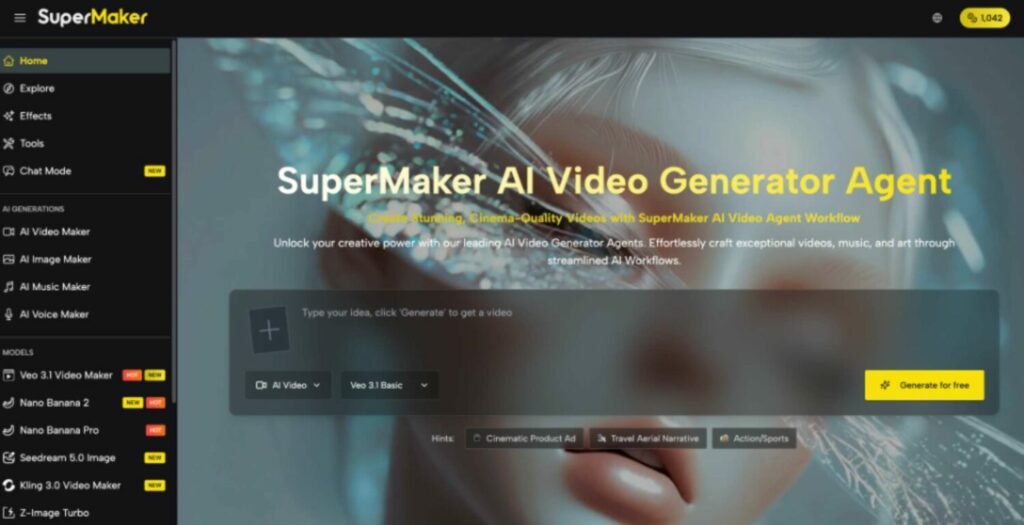
The answer is not to generate a decorative picture and publish it immediately. Local communication works when the visual reflects the activity, leaves room for essential information, and still looks clear on a phone. An AI Image Maker can help create the initial visual material, but a useful result still depends on a precise brief, careful selection, and human review before the image represents a business or community group in public.
Businesses Can Create Better Local Campaign Visuals With AI

Why Local Campaign Images Often Underperform

Many weak campaign images begin without a defined job. One picture is expected to become an Instagram post, a vertical story, a website banner, and a printed flyer, even though each format needs different framing. Text is then placed over a busy subject, logos compete with decorative details, and the final image becomes difficult to understand on the small screen where many local readers first encounter it.

Generic imagery creates a second problem. A polished vineyard, showroom, or festival scene may look attractive but contain architecture, products, clothing, or landscapes that do not resemble the place being promoted. This can make an otherwise accurate announcement feel artificial. AI generation is most valuable when it fills a specific visual gap, not when it invents local facts or substitutes fictional scenes for documentary photography.


Build a Brief Before Generating Images

A short creative brief saves more time than trying dozens of unrelated prompts. The following sequence turns a vague idea into instructions that can be evaluated consistently.

  1. Define One Communication Goal

Decide what the audience should understand or do after seeing the image. A furniture maker may want to introduce a new collection, while a neighborhood association may need residents to remember an event date. Keep the visual goal separate from all supporting details. If the campaign has three different messages, create three focused assets instead of forcing them into one crowded composition.

  1. Identify the Real Audience Context

Consider where and when local readers will see the material. Someone scrolling on a phone needs an immediate subject and strong contrast; a visitor viewing a website banner can absorb a wider scene. Age, language, and familiarity with the event also affect what must be explained. A traditional celebration may need little introduction locally, whereas a new workshop requires clearer visual clues about the activity.

  1. Choose Authentic Visual References

List the features that make the idea relevant to Yecla: a genuine product shape, a recognizable material, an appropriate color palette, or the real character of a venue. Use owned or authorized reference images when accuracy matters. Do not ask a generator to recreate a specific local person, private property, protected artwork, or business identity without permission.

  1. Reserve Space for Essential Information

The generated image should support the announcement rather than contain every word. Decide in advance where the headline, date, venue, price, and organizer name will sit. Requesting open space on one side of the composition makes later layout easier. Text generated inside an image may contain errors, so important details should be added separately in a design or publishing tool.

  1. Set a Simple Visual Direction

Describe lighting, viewpoint, color, mood, and level of realism in plain language. “Warm evening light, handcrafted oak table in a restrained Mediterranean interior, wide composition with empty space on the left” gives the system useful choices to follow. Phrases such as “beautiful,” “professional,” or “make it viral” provide much less control because they do not define visible features.


Generate Options and Select Them Carefully

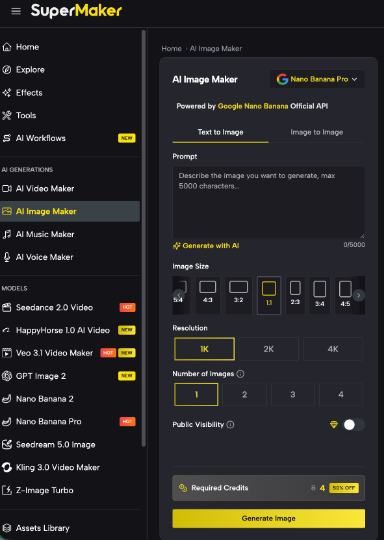
The current page supports both text-to-image and image-to-image workflows. It also offers multiple aspect ratios, output resolutions from 1K to 4K, and the option to generate between one and four images. These settings are useful when they follow the brief: a 9:16 output can support a story, 1:1 suits many feed layouts, and 16:9 works for a website header or presentation screen.

Instead of requesting four nearly identical pictures automatically, use an AI Image Maker to answer one creative question at a time. An initial set might compare composition, followed by a second round that refines the strongest direction. Keep the prompt and settings for each useful version so the team can reproduce the visual language instead of rebuilding the campaign from memory.

  1. Check the Main Subject First

View each option at thumbnail size and ask whether the subject remains obvious. If a chair, bottle, musician, or workshop activity disappears into the background, extra detail will not solve the problem. Choose the clearest composition before judging small textures.

  1. Check Local Accuracy Separately

Inspect anything that could be mistaken for a factual representation of Yecla. AI can invent labels, landmarks, grape varieties, furniture construction, traditional clothing, and architectural details. Replace uncertain elements with verified material, or describe the picture as a conceptual illustration rather than a photograph of a real place or event.

  1. Check Every Edge and Object

Look for distorted hands, repeated objects, broken furniture joints, unreadable packaging, inconsistent shadows, and shapes merging at the frame edge. High resolution can make defects more visible rather than correct them. Review the whole image before spending time on typography and final layout.

  1. Check the Intended Crop

Test the picture in its real placement. A subject that looks balanced in a wide image may be cut off when converted into a vertical post. Generate the primary formats deliberately instead of relying on automatic cropping, especially when the campaign will appear across several channels.
Businesses Can Create Better Local Campaign Visuals With AI

Match Visuals to Real Local Uses

For furniture businesses, generated imagery can help explore room settings, color combinations, and seasonal campaign concepts before a real product shoot. The final advertisement should clearly distinguish between a conceptual setting and the product actually available. Accurate photographs remain essential when buyers need to judge dimensions, materials, finishes, or construction details.

Wine, food, and hospitality businesses can create mood boards or neutral backgrounds for tasting announcements, menus, and social posts. Labels, bottles, dishes, vineyards, and venues should come from authorized real photography whenever the visual could influence a purchasing decision. AI is better used to create atmosphere around verified assets than to invent a bottle or location that customers may expect to find.

Cultural groups and event organizers can develop early poster directions for concerts, workshops, exhibitions, and local celebrations. A generated illustration can express a theme without pretending to document an event that has already happened. Organizers should add dates and venue information separately, review cultural details carefully, and obtain permission before using recognizable faces.

Community organizations can also create simple explanatory visuals for volunteer activities, neighborhood notices, and educational campaigns. In these cases, clarity matters more than spectacle. One recognizable action, restrained colors, and generous space for verified information will usually communicate better than an elaborate scene filled with symbolic objects.


Strong Local Visuals Begin With Judgment

A practical AI image workflow starts with a single communication goal, an authentic reference point, a suitable format, and planned space for real information. Generation then provides options that must be tested for clarity, local accuracy, technical defects, and the final crop. Documentary photographs should remain the standard whenever the audience needs evidence of a real person, product, place, or event.

Used with those boundaries, image generation can help small businesses and community groups explore ideas without losing the local character that gives their communication value. The long-term advantage is not producing more pictures for their own sake. It is building a repeatable process in which technology accelerates the first draft while people remain responsible for accuracy, identity, and the message their neighbors ultimately see.

epy.com
epy.com
Redactores de elperiodicodeyecla.com escriben con este nombre de autor para otra serie de artículos.
Sourceadsy

A furniture workshop preparing for a trade event, a wine shop announcing a tasting, or a cultural association promoting a weekend performance often faces the same practical problem: the message is ready, but there is no suitable image to publish. Stock photography may feel disconnected from Yecla, while arranging a professional shoot for every poster, story, and announcement is rarely realistic for a small organization working to a short deadline.

The answer is not to generate a decorative picture and publish it immediately. Local communication works when the visual reflects the activity, leaves room for essential information, and still looks clear on a phone. An AI Image Maker can help create the initial visual material, but a useful result still depends on a precise brief, careful selection, and human review before the image represents a business or community group in public.

Businesses Can Create Better Local Campaign Visuals With AI

Why Local Campaign Images Often Underperform

Many weak campaign images begin without a defined job. One picture is expected to become an Instagram post, a vertical story, a website banner, and a printed flyer, even though each format needs different framing. Text is then placed over a busy subject, logos compete with decorative details, and the final image becomes difficult to understand on the small screen where many local readers first encounter it.

Generic imagery creates a second problem. A polished vineyard, showroom, or festival scene may look attractive but contain architecture, products, clothing, or landscapes that do not resemble the place being promoted. This can make an otherwise accurate announcement feel artificial. AI generation is most valuable when it fills a specific visual gap, not when it invents local facts or substitutes fictional scenes for documentary photography.


Build a Brief Before Generating Images

A short creative brief saves more time than trying dozens of unrelated prompts. The following sequence turns a vague idea into instructions that can be evaluated consistently.

  1. Define One Communication Goal

Decide what the audience should understand or do after seeing the image. A furniture maker may want to introduce a new collection, while a neighborhood association may need residents to remember an event date. Keep the visual goal separate from all supporting details. If the campaign has three different messages, create three focused assets instead of forcing them into one crowded composition.

  1. Identify the Real Audience Context

Consider where and when local readers will see the material. Someone scrolling on a phone needs an immediate subject and strong contrast; a visitor viewing a website banner can absorb a wider scene. Age, language, and familiarity with the event also affect what must be explained. A traditional celebration may need little introduction locally, whereas a new workshop requires clearer visual clues about the activity.

  1. Choose Authentic Visual References

List the features that make the idea relevant to Yecla: a genuine product shape, a recognizable material, an appropriate color palette, or the real character of a venue. Use owned or authorized reference images when accuracy matters. Do not ask a generator to recreate a specific local person, private property, protected artwork, or business identity without permission.

  1. Reserve Space for Essential Information

The generated image should support the announcement rather than contain every word. Decide in advance where the headline, date, venue, price, and organizer name will sit. Requesting open space on one side of the composition makes later layout easier. Text generated inside an image may contain errors, so important details should be added separately in a design or publishing tool.

  1. Set a Simple Visual Direction

Describe lighting, viewpoint, color, mood, and level of realism in plain language. “Warm evening light, handcrafted oak table in a restrained Mediterranean interior, wide composition with empty space on the left” gives the system useful choices to follow. Phrases such as “beautiful,” “professional,” or “make it viral” provide much less control because they do not define visible features.


Generate Options and Select Them Carefully

The current page supports both text-to-image and image-to-image workflows. It also offers multiple aspect ratios, output resolutions from 1K to 4K, and the option to generate between one and four images. These settings are useful when they follow the brief: a 9:16 output can support a story, 1:1 suits many feed layouts, and 16:9 works for a website header or presentation screen.

Instead of requesting four nearly identical pictures automatically, use an AI Image Maker to answer one creative question at a time. An initial set might compare composition, followed by a second round that refines the strongest direction. Keep the prompt and settings for each useful version so the team can reproduce the visual language instead of rebuilding the campaign from memory.

  1. Check the Main Subject First

View each option at thumbnail size and ask whether the subject remains obvious. If a chair, bottle, musician, or workshop activity disappears into the background, extra detail will not solve the problem. Choose the clearest composition before judging small textures.

  1. Check Local Accuracy Separately

Inspect anything that could be mistaken for a factual representation of Yecla. AI can invent labels, landmarks, grape varieties, furniture construction, traditional clothing, and architectural details. Replace uncertain elements with verified material, or describe the picture as a conceptual illustration rather than a photograph of a real place or event.

  1. Check Every Edge and Object

Look for distorted hands, repeated objects, broken furniture joints, unreadable packaging, inconsistent shadows, and shapes merging at the frame edge. High resolution can make defects more visible rather than correct them. Review the whole image before spending time on typography and final layout.

  1. Check the Intended Crop

Test the picture in its real placement. A subject that looks balanced in a wide image may be cut off when converted into a vertical post. Generate the primary formats deliberately instead of relying on automatic cropping, especially when the campaign will appear across several channels.

Businesses Can Create Better Local Campaign Visuals With AI

Match Visuals to Real Local Uses

For furniture businesses, generated imagery can help explore room settings, color combinations, and seasonal campaign concepts before a real product shoot. The final advertisement should clearly distinguish between a conceptual setting and the product actually available. Accurate photographs remain essential when buyers need to judge dimensions, materials, finishes, or construction details.

Wine, food, and hospitality businesses can create mood boards or neutral backgrounds for tasting announcements, menus, and social posts. Labels, bottles, dishes, vineyards, and venues should come from authorized real photography whenever the visual could influence a purchasing decision. AI is better used to create atmosphere around verified assets than to invent a bottle or location that customers may expect to find.

Cultural groups and event organizers can develop early poster directions for concerts, workshops, exhibitions, and local celebrations. A generated illustration can express a theme without pretending to document an event that has already happened. Organizers should add dates and venue information separately, review cultural details carefully, and obtain permission before using recognizable faces.

Community organizations can also create simple explanatory visuals for volunteer activities, neighborhood notices, and educational campaigns. In these cases, clarity matters more than spectacle. One recognizable action, restrained colors, and generous space for verified information will usually communicate better than an elaborate scene filled with symbolic objects.


Strong Local Visuals Begin With Judgment

A practical AI image workflow starts with a single communication goal, an authentic reference point, a suitable format, and planned space for real information. Generation then provides options that must be tested for clarity, local accuracy, technical defects, and the final crop. Documentary photographs should remain the standard whenever the audience needs evidence of a real person, product, place, or event.

Used with those boundaries, image generation can help small businesses and community groups explore ideas without losing the local character that gives their communication value. The long-term advantage is not producing more pictures for their own sake. It is building a repeatable process in which technology accelerates the first draft while people remain responsible for accuracy, identity, and the message their neighbors ultimately see.

epy.com
epy.com
Redactores de elperiodicodeyecla.com escriben con este nombre de autor para otra serie de artículos.
uscríbete EPY

¿Quieres añadir un nuevo comentario?

Hazte EPY Premium, es gratuito.

Hazte Premium

1 COMENTARIO

epy.com
epy.com
Redactores de elperiodicodeyecla.com escriben con este nombre de autor para otra serie de artículos.
- Publicidad -spot_imgspot_imgspot_imgspot_img
- Publicidad -spot_img

Servicios

Demanda empleo Oferta empleo
Compra Venta
Canal inmobiliario Farmacia
Teléfono interes Autobuses