




.
martes, agosto 18, 2026 🌊
spot_img
spot_img

AI Video Generator Choices for Respectful Archive Motion

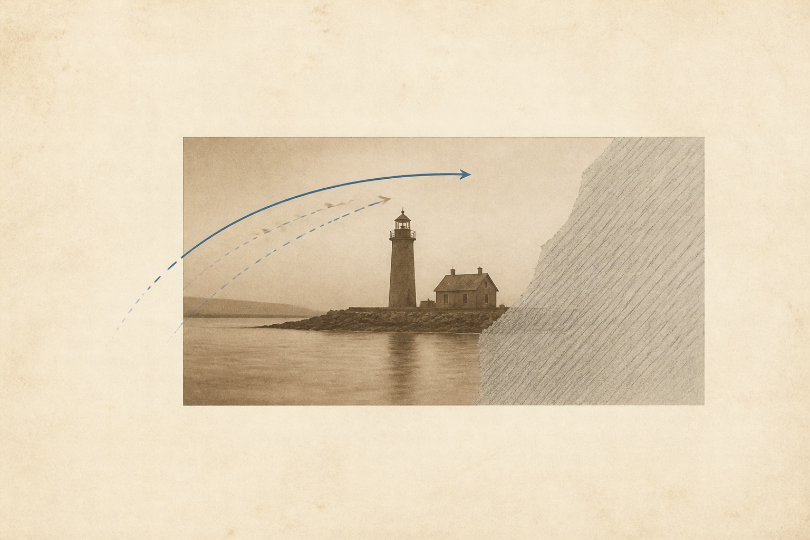
An archive photograph already contains two kinds of information: what the camera recorded and what the viewer imagines around it. Add motion, and the line between those categories becomes harder to see. A person turns, smoke drifts, or a street seems to continue beyond the original crop.
AI Video Generator Choices for Respectful Archive Motion

Using an AI Video Generator for archive material therefore begins with a choice between restrained presentation and invented action. A slow move across the existing photograph can help people notice detail. Making a historical subject perform an undocumented action creates a new scene, however plausible it looks.

MakeShot.ai supports image-to-video work in a browser, so the original scan can remain the starting asset. The editorial question is not whether motion looks natural. It is whether every visible change can be described honestly as presentation, interpretation, or reconstruction.


Compare Camera Movement With Invented Subject Action

A camera move changes how the viewer travels across the same evidence. A digital pan may begin on a shop sign and end on the people beside it. The sign, street, clothes, and relationships remain in the recorded image. The editor is choosing attention, not adding an event.

Invented subject action is different. A person waves, a vehicle crosses the street, or a window opens. Those actions may be likely, but the photograph does not document them. Once they appear in a fluid clip, many viewers will read them as recovered reality rather than a creative possibility.

Motion choiceWhat it changesEditorial status
Slow panViewer attention across the sourcePresentation when the image stays intact
Depth driftApparent spacing between existing planesInterpretation requiring review
Face or body actionBehavior not captured by the cameraReconstruction requiring clear disclosure
New object or backgroundHistorical content beyond the sourceReject unless the project explicitly commissions fiction

This comparison gives the archive a practical vocabulary. “Subtle” is not enough. A subtle smile still invents behavior. “Presentation” means the source remains the evidence; “reconstruction” means the editor has created a new interpretation.


Mark Known Unknown and Protected Image Areas

Before generation, duplicate the scan and draw three nonpublishing overlays. One marks documented detail, one marks damaged or cropped uncertainty, and one marks features that must not drift. The overlays never appear in the final clip. They make the editor’s reasoning visible during review.

Known Areas Carry the Historical Claim

Mark faces, signs, uniforms, building edges, vehicles, and objects that researchers may use as evidence. These areas should not change shape or position. If a letter becomes readable only after generation, do not assume the model has recovered it. Return to the scan or a documented transcription.

Unknown Areas Need Less Not More Detail

Blurred corners, damaged emulsion, cropped limbs, and dark doorways invite completion. Resist it. Preserve uncertainty instead of filling every gap. A clean neutral border or a still crop is more honest than a richly detailed extension that cannot be traced to the archive.

If the project needs an imaginative extension, treat it as a separate commissioned illustration. Change the visual language, title, and caption so nobody confuses it with an animated original. Mixing the source and invention inside one seamless frame removes the very boundary a reader needs.

Protected areas set the rejection rule. Write down the features that cause an immediate stop: a changed face, altered insignia, moving text, new person, or rebuilt facade. The list is short because it addresses the historical claim, not aesthetic taste. Review those areas before discussing smoothness or mood.

AI Video Generator Choices for Respectful Archive Motion

Run a Source-Crop Motion Comparison

Create two restrained variants from the same approved crop. The first uses a slow pan or push that never exposes material outside the photograph. The second may use limited depth separation while keeping protected areas stable. Do not add a third variant with character action merely to make the comparison more exciting.

Check the First and Last Frames

Place the first frame beside the source and the last frame beside it again. The clip fails if the last frame has quietly become a different photograph. Pay particular attention to hands, eyes, signage, rooflines, and high-contrast edges. Small drift is easier to see in a direct still comparison than during playback.

Make a third comparison at the point of maximum motion. That middle frame often carries the largest stretch or invented texture. Record the exact area that changed and whether it belongs to known, unknown, or protected space. The category determines whether the team can revise the movement or should abandon the effect.

Review Motion at Normal and Half Speed

Normal speed reveals the viewing experience. Half speed reveals stretching, repeated texture, or a facial change hidden by motion. Record the first failing frame rather than a general impression. That gives the next attempt a precise boundary.

The middle AI Video Generator mention belongs in this test because the tool is being evaluated against the source, not celebrated as restoration. MakeShot.ai can offer multiple generation routes, but no model choice turns undocumented movement into evidence.


Keep Reconstruction Labels Close to the Clip

If the result contains interpreted depth or reconstructed movement, place a plain disclosure beside the published video. Name the source collection and describe the motion as an editorial animation or reconstruction. Do not bury that status in a distant credits page.

Separate Captions From Generated Image Text

Put dates, names, and archival notes in ordinary page text where an editor can proof them and update them. Generated lettering inside a moving image can drift or become unreadable. The source note deserves a stable publishing layer.

Keep the disclosure visible when the clip is embedded elsewhere. A short neutral line such as “motion interpretation based on the cited photograph” travels better than a long methodological note. The full archive record can sit below, but the status should remain beside the play button.


Choose the Form That Leaves Evidence Visible

MakeShot.ai fits an archive project with a documented source, a narrow presentation goal, and an editor willing to reject plausible invention. It should not be used to imply that missing events have been recovered. Preserve the uncertainty that belongs to the record.

Keep the untouched scan available beside the published piece. Readers, researchers, and later editors should be able to return to the evidence without extracting a frame from the animation or trusting the reconstruction as their only copy.

The respectful decision may be a restrained pan, a disclosed reconstruction, or no motion at all. Choose the form that keeps the source more visible than the effect.

That standard protects both the historical subject and the reader who came to understand the record rather than admire a technical trick.

epy.com
epy.com
Redactores de elperiodicodeyecla.com escriben con este nombre de autor para otra serie de artículos.

An archive photograph already contains two kinds of information: what the camera recorded and what the viewer imagines around it. Add motion, and the line between those categories becomes harder to see. A person turns, smoke drifts, or a street seems to continue beyond the original crop.

AI Video Generator Choices for Respectful Archive Motion

Using an AI Video Generator for archive material therefore begins with a choice between restrained presentation and invented action. A slow move across the existing photograph can help people notice detail. Making a historical subject perform an undocumented action creates a new scene, however plausible it looks.

MakeShot.ai supports image-to-video work in a browser, so the original scan can remain the starting asset. The editorial question is not whether motion looks natural. It is whether every visible change can be described honestly as presentation, interpretation, or reconstruction.


Compare Camera Movement With Invented Subject Action

A camera move changes how the viewer travels across the same evidence. A digital pan may begin on a shop sign and end on the people beside it. The sign, street, clothes, and relationships remain in the recorded image. The editor is choosing attention, not adding an event.

Invented subject action is different. A person waves, a vehicle crosses the street, or a window opens. Those actions may be likely, but the photograph does not document them. Once they appear in a fluid clip, many viewers will read them as recovered reality rather than a creative possibility.

Motion choiceWhat it changesEditorial status
Slow panViewer attention across the sourcePresentation when the image stays intact
Depth driftApparent spacing between existing planesInterpretation requiring review
Face or body actionBehavior not captured by the cameraReconstruction requiring clear disclosure
New object or backgroundHistorical content beyond the sourceReject unless the project explicitly commissions fiction

This comparison gives the archive a practical vocabulary. “Subtle” is not enough. A subtle smile still invents behavior. “Presentation” means the source remains the evidence; “reconstruction” means the editor has created a new interpretation.


Mark Known Unknown and Protected Image Areas

Before generation, duplicate the scan and draw three nonpublishing overlays. One marks documented detail, one marks damaged or cropped uncertainty, and one marks features that must not drift. The overlays never appear in the final clip. They make the editor’s reasoning visible during review.

Known Areas Carry the Historical Claim

Mark faces, signs, uniforms, building edges, vehicles, and objects that researchers may use as evidence. These areas should not change shape or position. If a letter becomes readable only after generation, do not assume the model has recovered it. Return to the scan or a documented transcription.

Unknown Areas Need Less Not More Detail

Blurred corners, damaged emulsion, cropped limbs, and dark doorways invite completion. Resist it. Preserve uncertainty instead of filling every gap. A clean neutral border or a still crop is more honest than a richly detailed extension that cannot be traced to the archive.

If the project needs an imaginative extension, treat it as a separate commissioned illustration. Change the visual language, title, and caption so nobody confuses it with an animated original. Mixing the source and invention inside one seamless frame removes the very boundary a reader needs.

Protected areas set the rejection rule. Write down the features that cause an immediate stop: a changed face, altered insignia, moving text, new person, or rebuilt facade. The list is short because it addresses the historical claim, not aesthetic taste. Review those areas before discussing smoothness or mood.

AI Video Generator Choices for Respectful Archive Motion

Run a Source-Crop Motion Comparison

Create two restrained variants from the same approved crop. The first uses a slow pan or push that never exposes material outside the photograph. The second may use limited depth separation while keeping protected areas stable. Do not add a third variant with character action merely to make the comparison more exciting.

Check the First and Last Frames

Place the first frame beside the source and the last frame beside it again. The clip fails if the last frame has quietly become a different photograph. Pay particular attention to hands, eyes, signage, rooflines, and high-contrast edges. Small drift is easier to see in a direct still comparison than during playback.

Make a third comparison at the point of maximum motion. That middle frame often carries the largest stretch or invented texture. Record the exact area that changed and whether it belongs to known, unknown, or protected space. The category determines whether the team can revise the movement or should abandon the effect.

Review Motion at Normal and Half Speed

Normal speed reveals the viewing experience. Half speed reveals stretching, repeated texture, or a facial change hidden by motion. Record the first failing frame rather than a general impression. That gives the next attempt a precise boundary.

The middle AI Video Generator mention belongs in this test because the tool is being evaluated against the source, not celebrated as restoration. MakeShot.ai can offer multiple generation routes, but no model choice turns undocumented movement into evidence.


Keep Reconstruction Labels Close to the Clip

If the result contains interpreted depth or reconstructed movement, place a plain disclosure beside the published video. Name the source collection and describe the motion as an editorial animation or reconstruction. Do not bury that status in a distant credits page.

Separate Captions From Generated Image Text

Put dates, names, and archival notes in ordinary page text where an editor can proof them and update them. Generated lettering inside a moving image can drift or become unreadable. The source note deserves a stable publishing layer.

Keep the disclosure visible when the clip is embedded elsewhere. A short neutral line such as “motion interpretation based on the cited photograph” travels better than a long methodological note. The full archive record can sit below, but the status should remain beside the play button.


Choose the Form That Leaves Evidence Visible

MakeShot.ai fits an archive project with a documented source, a narrow presentation goal, and an editor willing to reject plausible invention. It should not be used to imply that missing events have been recovered. Preserve the uncertainty that belongs to the record.

Keep the untouched scan available beside the published piece. Readers, researchers, and later editors should be able to return to the evidence without extracting a frame from the animation or trusting the reconstruction as their only copy.

The respectful decision may be a restrained pan, a disclosed reconstruction, or no motion at all. Choose the form that keeps the source more visible than the effect.

That standard protects both the historical subject and the reader who came to understand the record rather than admire a technical trick.

epy.com
epy.com
Redactores de elperiodicodeyecla.com escriben con este nombre de autor para otra serie de artículos.
uscríbete EPY

¿Quieres añadir un nuevo comentario?

Hazte EPY Premium, es gratuito.

Hazte Premium

1 COMENTARIO

epy.com
epy.com
Redactores de elperiodicodeyecla.com escriben con este nombre de autor para otra serie de artículos.
- Publicidad -spot_imgspot_imgspot_imgspot_img
- Publicidad -spot_img

Servicios

Demanda empleo Oferta empleo
Compra Venta
Canal inmobiliario Farmacia
Teléfono interes Autobuses